Sometimes an application will not work properly unless it is run as an administrator.
In this article, I will give brief instructions on how to open an application as administrator and how to make it always open as administrator. The instructions are for Windows 11 / Windows 10 / Windows 8.1
1) First, let’s look at how to open the application as an administrator.
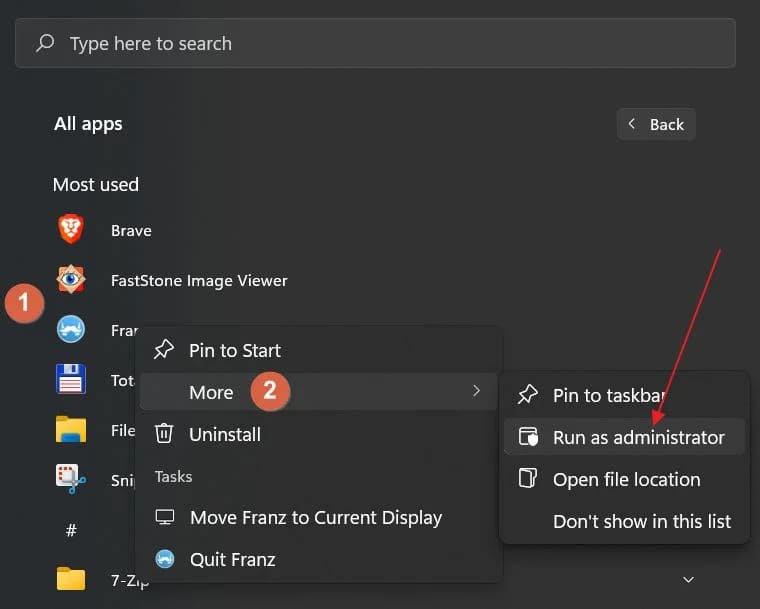
(If the application is launched from the Start menu) Right click on the desired application => More => Run as administrator.
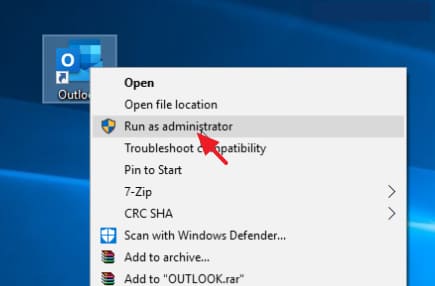
(In case of launching an application from Explorer or Desktop) Right click on the desired application => Run as administrator.
2) You can also open any file as an administrator by pressing the Shift key on your keyboard and open any application at that moment.
3) Now let’s look at how to open the file from the Admin so that it is saved for future launches of the application.
To do this, you need to create a shortcut to the application itself, if you don’t already have one. Then right click on the application shortcut => Properties.
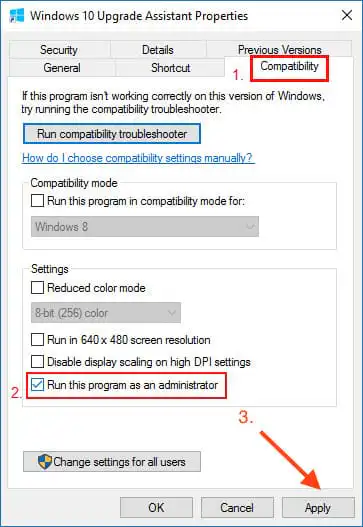
Then in the “Properties” window => go to the “Compatibility” tab => click the “Run this program as administrator” checkbox => after saving the setting, you need to click the “Apply” button => Ok.
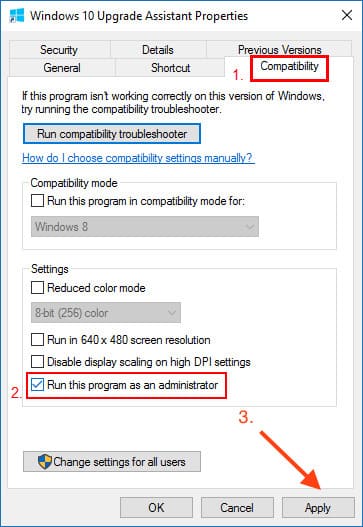
Now every time you run the application normally from a shortcut, it will be forced to run as administrator.