
If you’re running Windows 8 or 8.1 and want to upgrade to Windows 11 without losing data, formatting, or performing a clean reinstall, you’ll need to do a “step-by-step” upgrade. This means that you should upgrade to Windows 10 first, and then continue to upgrade to Windows 11. It is not officially possible to upgrade directly from Windows 8 or 8.1 to Windows 11. Windows 10 is a prerequisite for the upgrade.
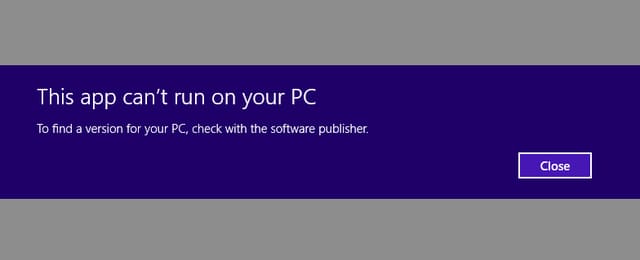
When attempting a direct upgrade from Windows 8/8.1 to Windows 11, you’ll encounter an error message similar to the screenshot below, stating “This app can’t run on your PC.”
1) Start by checking the minimum requirements for Windows 11 on the Microsoft website. If the minimum requirements are not met, upgrading to Windows 11 will be impossible, and you will encounter errors during the upgrade.
Pay attention to the TPM 2.0 module, which can be physical or virtual. Depending on your motherboard model, you can enable TPM virtualization in your BIOS (UEFI). BIOS (UEFI) settings vary among motherboard manufacturers, and you can refer to a sample video guide on how to enable TPM.
Additionally, the upgrade is only possible for x64-bit systems, as Windows 11 does not support x32 (x86).
2) Now you can proceed with the upgrade from Windows 8/8.1 to Windows 10 using the instructions in our previous article.
3) After successfully upgrading to Windows 10, proceed with the upgrade from Windows 10 to Windows 11. Follow the instructions in our guide on upgrading from Windows 10 to Windows 11.
By following these steps, you can upgrade your Windows 8/8.1 to Windows 11 while preserving all your files and installed applications.
If you have any additional questions, please contact our support team by using the chat in the bottom right corner of the window or by emailing us at admin@softcomputers.org.