This guide explains how to activate AHCI mode on Intel-based systems running Windows 8/8.1 or Windows 7 post-installation. While enabling AHCI during OS setup is ideal, these methods bypass the 0x0000007B INACCESSIBLE_BOOT_DEVICE error (BSOD) without reinstalling Windows.
Purchase genuine Windows 7 and Windows 8.1 keys:
Windows 7 – from $13.30
Windows 8.1 – from $15.00
Why Use AHCI?
AHCI enables NCQ (Native Command Queuing) for HDDs/SSDs, boosting performance. It also supports hot-swapping for storage devices.

Method 1: Enable AHCI via Safe Mode (Windows 8/8.1)
Step-by-Step Guide
1. If AHCI causes boot errors, revert to IDE ATA mode in BIOS.
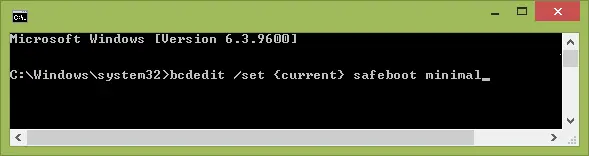
2. Open Admin Command Prompt (Win+X > Command Prompt (Admin)).
3. Run:
bcdedit /set {current} safeboot minimal
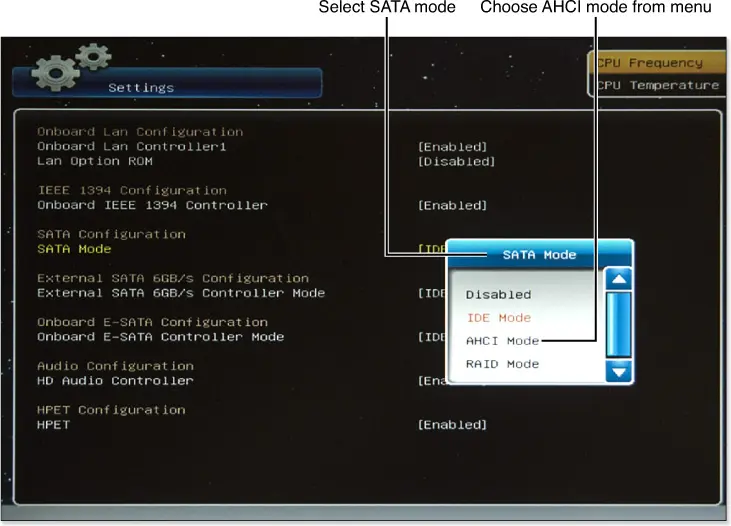
4. Reboot, enable AHCI in BIOS/UEFI (SATA Mode section), and save changes.
5. Windows boots into Safe Mode and installs AHCI drivers.

6. Reopen Admin Command Prompt and run:
bcdedit /deletevalue {current} safeboot
7. Reboot again. Windows 8/8.1 now runs with AHCI enabled.
Method 2: Intel Driver Workaround
For Systems with Intel Chipsets
1. Download AHCI drivers (f6flpy) from Intel’s official site (match OS bitness).
2. Extract SetupRST.exe from the same download.
3. In Device Manager, update the SATA controller driver to the f6 AHCI driver.
4. Reboot, enable AHCI in BIOS.
5. Install SetupRST.exe post-reboot.
Method 3: Enable AHCI in Windows 7 via Registry
Manual Configuration
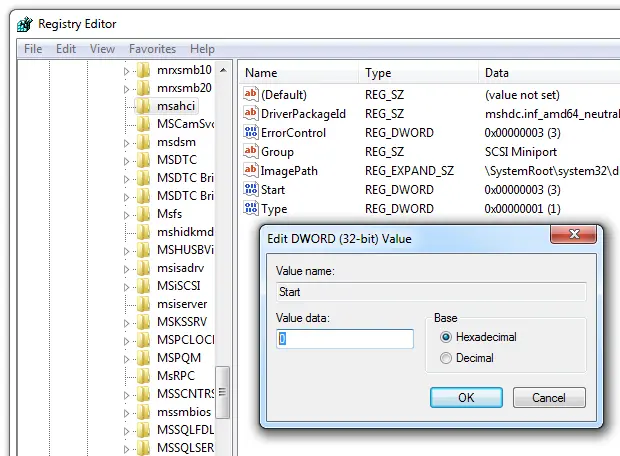
1. Open Registry Editor (Win+R > regedit).
2. Navigate to:
HKEY_LOCAL_MACHINE\SYSTEM\CurrentControlSet\services\msahci
3. Set the Start value to 0 (default: 3).
4. Repeat for:
HKEY_LOCAL_MACHINE\SYSTEM\CurrentControlSet\services\IastorV
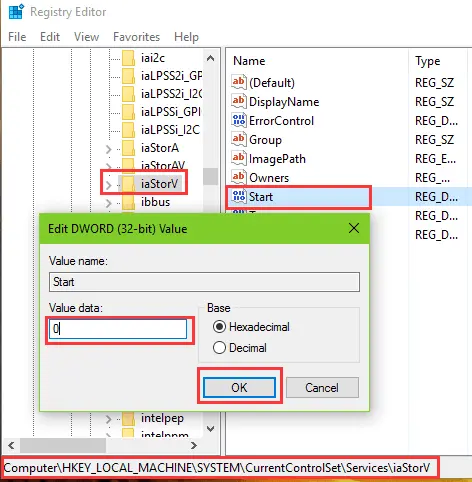
5. Close Registry Editor, reboot, enable AHCI in BIOS.
6. Windows 7 installs drivers and reboots again.
Troubleshooting: Fixing BSOD 0x0000007B
Manual Workaround
Microsoft’s Fix It tool is discontinued, but manual methods resolve the INACCESSIBLE_BOOT_DEVICE error. Follow the steps above for your OS version.
Enabling AHCI improves HDD/SSD performance but requires precise steps. Use the method matching your OS version to avoid errors.