






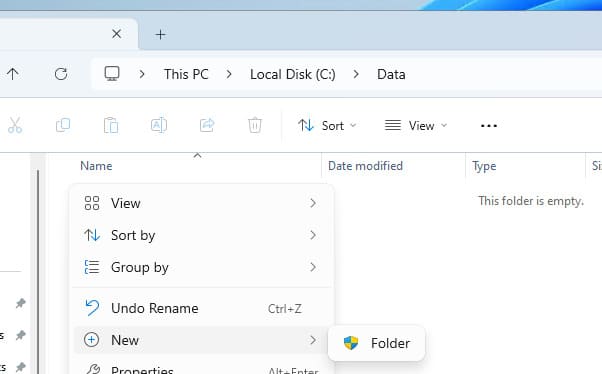
In some cases, Windows users may encounter an issue where the File Explorer context menu lacks options to create new files or folders, even with local administrator privileges. Sometimes only the “New Folder” option with a UAC icon appears, while file creation remains unavailable despite admin rights.
Step 1: Verify NTFS Permissions
If the context menu lacks file/folder creation options, first check NTFS permissions for the directory. To enable file creation, the user account or group must have:
– Create files / write data
– Write attributes
– Write extended attributes
– Create folders / append data
How to check and configure permissions:
1. Open the target folder’s properties
2. Navigate to Security and grant Write permissions to the user/group
3. For granular control, select Advanced > Show advanced permissions to specify exact rights
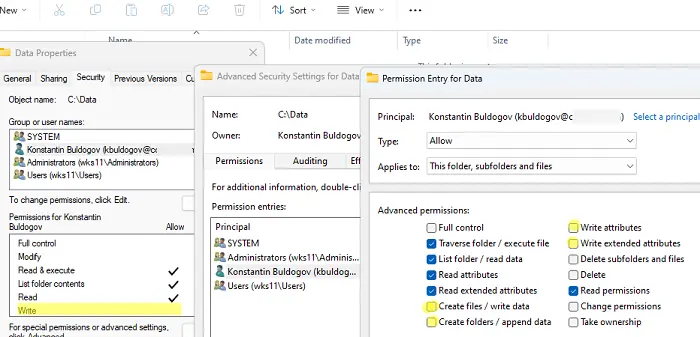
After applying these changes, the “New” context menu in File Explorer will display all file creation options.
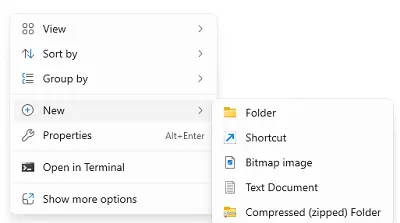
If the “New” button is missing entirely, inspect registry settings.
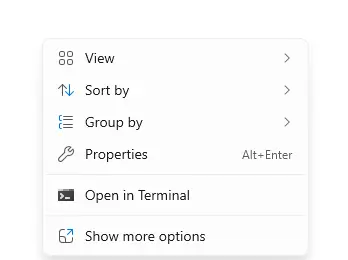
Step 2: Verify Registry Settings
If NTFS permissions are correct but creation options remain missing:
1. Launch Registry Editor (regedit) and navigate to:
HKEY_CLASSES_ROOT\Directory\Background\shellex\ContextMenuHandlers
2. Confirm the (Default) value contains:
{D969A300-E7FF-11d0-A93B-00A0C90F2719}
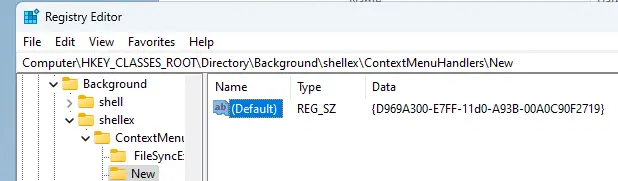
3. Recreate this value manually if missing
Step 3: Restore New Folder Creation
If the “New Folder” option is absent:
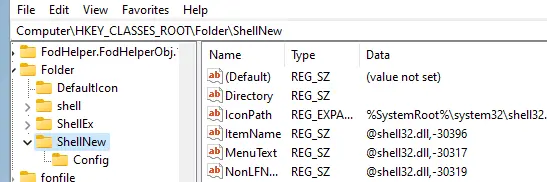
1. Navigate to:
HKEY_CLASSES_ROOT\Folder
2. Ensure the ShellNew subkey exists. If missing, import it from a working system
Inability to create files/folders in Windows Explorer typically stems from incorrect NTFS permissions or registry misconfigurations. Follow these steps to restore functionality and resolve the issue permanently.