


In this article, I will guide you through the process of updating Windows 10 to Windows 11 officially without losing files and installed applications. If your Windows 10 is not activated, recommend activating it before proceeding with the update. You can purchase original product keys for various editions of Windows 10 in our catalog. The product will be delivered instantly to your email after payment in automatic mode. Now, let’s proceed with the update:
1) Visit the Microsoft website, specifically the page – https://www.microsoft.com/en-US/software-download/windows11
Download the Windows 11 Installation Assistant and run it.
You can also download the Windows11InstallationAssistant application directly from our server through this link.

2) After launching the utility, if you encounter the window below and pressing the “Update” button does not initiate any further actions, it means that some minimum system requirements or technical requirements are not met. Review the requirements on the Microsoft website.
The most common errors occur for the following reasons:
The TPM module is not enabled, or its virtualization in the BIOS (UEFI) is not configured.
The system is not logged in with a Microsoft account.
There is less than 64 GB of free space on the system drive.

3) If your system meets the minimum requirements, you should see a license agreement when starting the update application. Click “Accept and Install.”

4) The actual update process will now begin. First, there will be updates downloading, followed by the verification of downloaded files, and then their installation. Wait for the completion of all stages; this may take up to 30 minutes.


When the installation is complete, the update wizard will prompt you to restart. Click “Restart Now.”

5) After the restart, wait for the system to load the latest updates and install them. This may take some time.


6) After installing the updates, wait for the system to prepare the Windows 11 desktop for you.

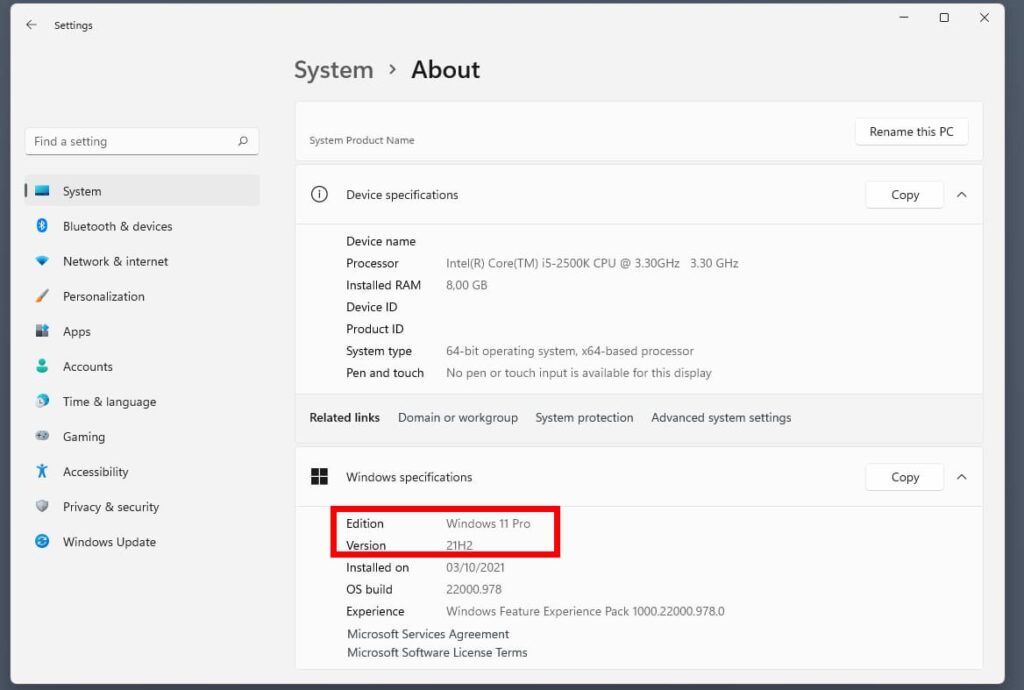
Done! After the update, you can check your system version.