





Blog

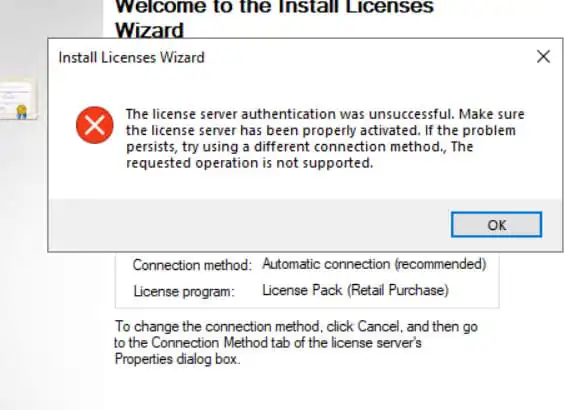
In this article, I will discuss a failure to activate an RDS (RDP) license in Windows Server: The license server authentication was unsuccessful. Make sure the license server has been properly activated. If the problem persists, try using a different connection method. The requested operation is not supported.
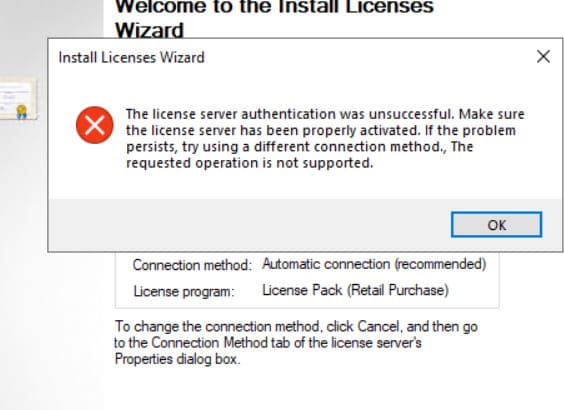
– This error usually occurs because you have a firewall on the Internet connection between your server and Microsoft’s servers. Disable any firewalls that may prevent blocking.

In addition, if you have any antivirus installed, disabling it will not be enough, you will need to remove it from the server for the duration of the RDS key activation.

– Please verify the availability of all necessary services for RDS and ensure that the RDS settings are correct. To do this, see our step-by-step instructions for enabling Windows Server Remote Desktops on the next page.

banner for Windows Server 2022
Windows Server 2022 license from
$19.70 ·
Picking your discount
Promo code ·
Promo code expired. A new one in .
Buy valid for

"Personal discount from 5% to 12%" — promotion rules

  1. Organizer — SoftComputers LLP, website softcomputers.net. The promotion runs indefinitely; the organizer may end it at any time by removing the block from the website.
  2. Participation is free. To take part, enter your email and agree to the processing of personal data and to receive emails.
  3. Each participant receives a promo code for a 5% to 12% discount on any product in the catalog. The amount is chosen at random.
  4. The promo code is single-use, tied to the email you entered, valid for 7 days and applied in the cart at checkout. No minimum order amount. Cannot be combined with other promo codes.
  5. One participant (email / device) can receive one promo code per 7 days; a new code is issued after the previous one expires.
  6. The promo code cannot be exchanged for money. The organizer may void a code in case of abuse.
Subscribe
Notify of
guest
0 comments
Newest
Oldest










