
This article explains how to prevent users on a terminal server from using Internet Explorer to access the internet. This is often necessary for administrators to restrict internet access through the default Windows browser. The most convenient method is to use built-in Group Policy features, specifically “Software Restriction Policies.” This can be configured directly on the server or through Active Directory Group Policies.
Configuring Software Restriction Policies
1. Open the Group Policy Editor
Launch the Group Policy Editor by pressing Win+R and entering gpedit.msc. Navigate to: Computer Configuration → Windows Settings → Security Settings → Software Restriction Policies.
If this section is empty, right-click and select Create Software Restriction Policies.
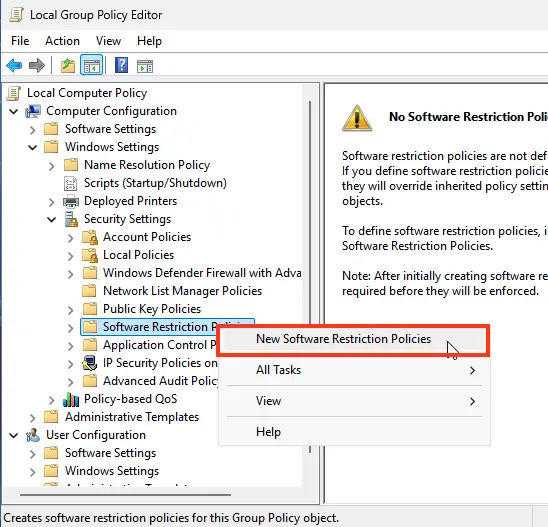
2. Configure Security Levels
Open Security Levels and ensure the default level is set to Unrestricted.
3. Create a Path Rule
Go to Additional Rules, right-click, and select Create Path Rule.
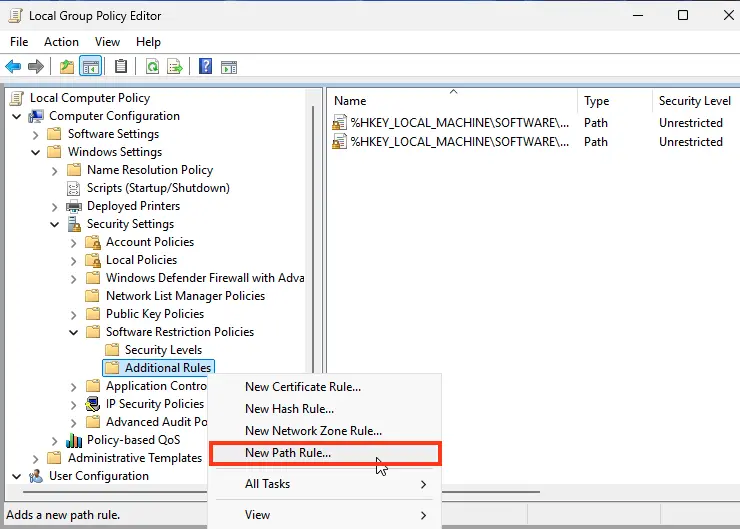
In the Path field, enter iexplore.exe, and in the Security Level dropdown, select Disallowed.
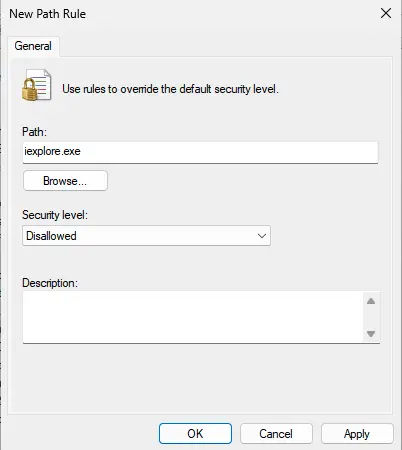
4. Apply Changes
Click OK and verify that Internet Explorer is blocked from launching.
If configured correctly and no conflicting policies exist, users attempting to launch Internet Explorer should see an access restriction message.