In this article, I’ll discuss how to find out and view which product key is activated (installed) in your Microsoft Office. This method will work only if you have indeed entered some key into the MS Office application on your PC.
If you don’t have a product key and want to activate your version of Microsoft Office, you can purchase product keys for various Office versions in our catalog starting from $9.90. Instant delivery of the product to your email automatically. Guarantee and round-the-clock support.
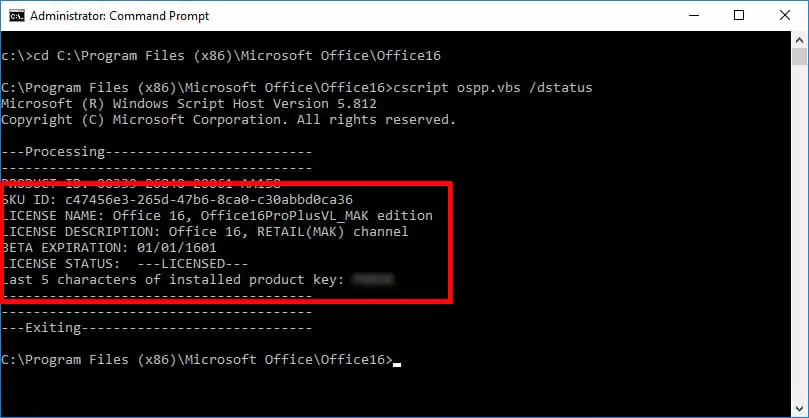
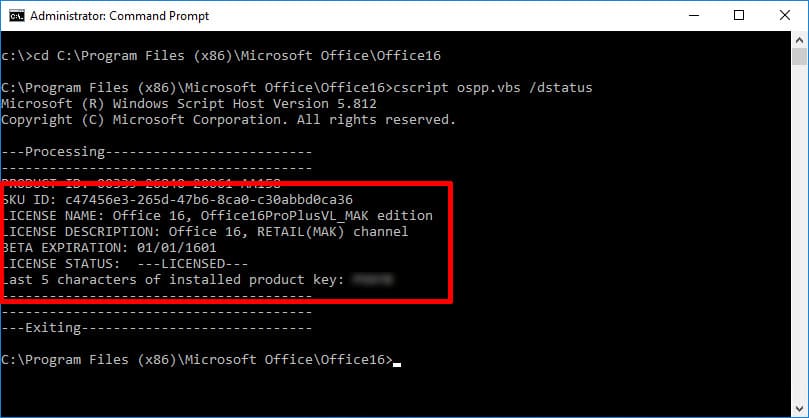
So, if you have MS Office 2016 or 2019 installed, you can view the last 5 characters of the product key through the command line and compare it with your purchased key on the box / disk / email, depending on where and how your seller sent you the Office license.
Press the hotkeys Win + R
Then sequentially enter the following commands:
cd /d C:\Program Files\Microsoft Office\Office16
cscript ospp.vbs /dstatus
Next, in the displayed result, the line “Last 5 characters of installed product key:” will show you the last 5 characters of your product key.
Here everything is similar to Office 2019 and 2016, except for a slight change in the command; using the command in the terminal, you can find out the last 5 characters of your product key that you activated in the MS Office application.
Press the hotkeys Win + R
Then sequentially enter the following commands:
cd /d C:\Program Files\Microsoft Office\Office15
cscript ospp.vbs /dstatus
Similarly, in the displayed result, you can find the last 5 characters of your product key.
Similarly for Office 2010, with changes in the entered digits in the command in the terminal.
Press the hotkeys Win + R
Then sequentially enter the following commands:
cd ”c:\Program Files\Microsoft Office\Office14”
cd /d C:\Program Files\Microsoft Office\Office14
cscript ospp.vbs /dstatus